Why Is Your Phone Charging Slowly?
Ever find yourself frustrated as your phone creeps along while charging? You’re not alone. Many users face the issue of their devices taking forever to charge. It’s not just an inconvenience; it can affect your daily routine. But why does this happen? There are various factors at play, ranging from hardware issues to software bugs. Understanding these can help you pinpoint the exact cause and apply the right Phone Charging Slowly Fix.
One of the primary reasons could be a faulty charger or cable. Over time, these accessories degrade, leading to inefficient charging. I remember a time when I thought my phone was at fault; I was always waiting for it to charge, only to discover that it was actually my old, frayed cable. Another common culprit is the phone’s battery health. As batteries age, their ability to hold a charge diminishes, significantly impacting charging speeds. Additionally, background apps running on your phone can also drain power faster than it’s being replenished, resulting in a slow charging experience.
Check Your Charging Accessories
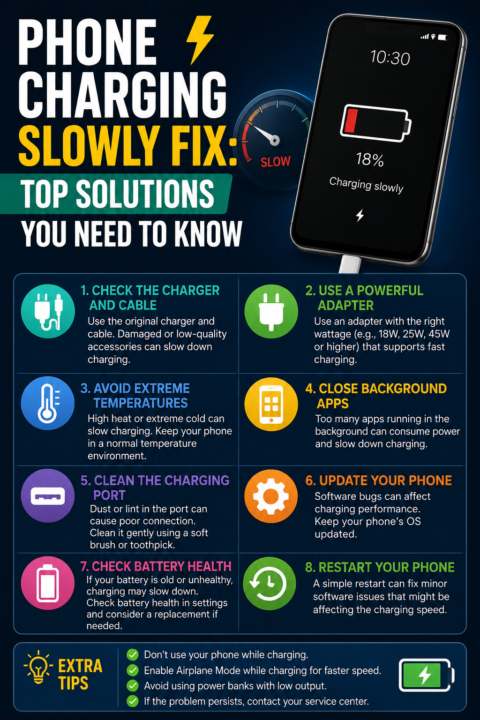
First off, let’s talk about your charger and cable. These are the lifelines for your phone’s battery. If either of these is damaged or of low quality, you might be facing slow charging. Start by inspecting your charging cable for any visible damage. Frayed wires or bent connectors can impede power flow. If your cable looks worn out, it’s time to invest in a new, high-quality replacement.
Next, examine your power adapter. Different chargers provide varying levels of output. For instance, if you’re using a charger that provides lower wattage than your phone requires, you’ll experience slow charging. Always check the specifications to ensure compatibility. Using the original charger that came with your phone is often the best choice. If you’ve lost it, try to find a third-party charger from a reputable brand. I’ve had great success with brands like Anker and Belkin, which offer reliable options that won’t let you down.
Assess Your Phone’s Battery Health
Moving on to the battery health itself, this is crucial for efficient charging. Most smartphones have built-in features that allow you to check battery health. For iPhones, go to Settings > Battery > Battery Health. If your battery’s maximum capacity is significantly lower than 100%, it might be time for a replacement. Android devices may have similar features, or you can use third-party apps to assess battery health.
A declining battery can lead to longer charge times and poor performance. If you notice your phone heating up while charging, this is a sign that the battery is struggling. I once had an experience where my phone would get unusually hot while charging, which turned out to be a sign of a failing battery. In such cases, consider visiting a professional repair service to get a new battery installed. A healthy battery not only ensures faster charging but also enhances your phone’s overall performance.
Optimize Your Phone Settings
Sometimes, your phone settings can inadvertently contribute to slow charging. Background apps, for instance, can drain your battery faster than it can recharge. To combat this, consider closing unnecessary applications when charging your device. On both iOS and Android, you can usually view which apps are consuming the most battery and manage them accordingly.
Moreover, enabling Airplane Mode while charging can significantly speed up the process. This mode disables all wireless communications and stops apps from running in the background, allowing your device to focus solely on charging. You’ll be amazed at how much faster your phone can charge when it’s not trying to do a million things at once. I always notice a difference when I enable Airplane Mode, especially if I’m in a low-signal area where my phone is constantly searching for a connection.
Clean Your Phone’s Charging Port
Another factor that could be slowing down your charging speed is debris in your phone’s charging port. Dust, lint, and other particles can accumulate over time, causing a poor connection between the charging cable and the phone. To clean the port, use a small, soft brush or a toothpick to gently remove any obstructions. Be careful not to damage the internal components while doing this. I once found a small piece of lint lodged in my port, which was enough to create charging issues. Increase Android Storage Space: Top Tips & Tricks
Regularly cleaning your charging port can prevent slow charging issues in the future. Make it a habit to check your phone’s port every few weeks, especially if you often carry your phone in your pocket or bag, where debris can easily gather. A quick clean can save you from a frustrating charging experience.
Update Your Phone’s Software
Software glitches can also lead to charging issues. Keeping your operating system updated is essential for optimal performance. Manufacturers regularly release updates that fix bugs and enhance device functionality. Check for any available updates by going to Settings > About Phone > Software Updates. Install any pending updates to ensure your phone runs smoothly and charges efficiently.
In addition to system updates, make sure your apps are up to date as well. Outdated apps can cause compatibility issues and drain battery life, leading to slower charging times. Regularly updating your apps can minimize these problems and improve overall device performance. I’ve noticed that my phone charges significantly faster after a software update, likely due to optimized battery management features.
Try a Different Power Source
Not all power sources are created equal. If you’re charging your phone from a USB port on your computer or a low-power outlet, you might experience slower charging speeds. Instead, try plugging your charger directly into a wall outlet for faster results. Wall chargers typically provide more power than USB ports, which can significantly speed up the charging process. I once charged my phone at a friend’s place using a USB port and was shocked at how sluggish it was, only to realize it was the power source.
If you’re on the go, consider investing in a portable power bank. These can be lifesavers when you’re away from home. Many high-capacity power banks can charge your phone multiple times, and they often come with fast charging capabilities. Just ensure that the power bank you choose is compatible with your device and supports the necessary output. I’ve personally found that a good power bank can be invaluable during long trips or busy days.
Consider Battery-Saving Modes
Many smartphones come equipped with battery-saving modes that can extend battery life but may also slow down charging. While these modes are useful for preserving battery, they can limit some functionalities. If your phone is in battery-saving mode while charging and you want a quicker charge, consider disabling this feature temporarily. This change can help your phone charge faster by allowing it to draw more power.
Be mindful, though; if you’re frequently relying on battery-saving modes, it may indicate that your battery is not holding a charge as it should. In such cases, evaluating your battery health and considering a replacement might be the best course of action. I’ve learned that finding a balance between battery-saving modes and performance is key to keeping my phone running smoothly.
When to Seek Professional Help
If you’ve tried all the above fixes and your phone is still charging slowly, it might be time to consult a professional. There could be underlying hardware issues that need expert attention. Problems like a damaged charging port, a malfunctioning battery, or even internal software issues can impede charging speeds.
Visiting a certified repair service can help diagnose the problem. They can run tests and determine if components need repair or replacement. Avoid attempting complex repairs yourself, as this could lead to further damage and void any warranties. I once attempted to fix my phone on my own and ended up making things worse, which taught me the value of professional help.
Conclusion
Experiencing slow charging can be a real hassle, but it’s usually fixable with a few steps. By checking your accessories, optimizing settings, and maintaining your phone’s health, you can significantly improve charging times. If all else fails, don’t hesitate to reach out to a professional for assistance. Remember, keeping your phone in good shape is key to avoiding future charging woes. And if you find yourself running out of storage while trying to manage all your apps, check out our article on Increase Android Storage Space: Top Tips & Tricks.
FAQs
Why is my phone charging slowly even with a fast charger?
If your phone is still charging slowly with a fast charger, it might be due to software issues, a faulty charging cable, or a degraded battery. Check these components to identify the problem.
Can charging my phone overnight damage the battery?
Modern smartphones are designed to avoid overcharging, so charging overnight is generally safe. However, frequent overnight charging can slowly degrade battery health over time.
How can I tell if my charger is faulty?
Signs of a faulty charger include inconsistent charging, overheating, or visible damage to the cable or adapter. Testing with another charger can help confirm the issue.
Does using my phone while charging slow down the process?
Yes, using your phone while charging can slow down the process. Background apps and screen usage drain battery power, which can offset the charging speed.
Is it worth investing in a high-speed charger?
Absolutely. A high-speed charger can significantly reduce charging time, especially if you frequently find yourself short on battery. Just ensure it’s compatible with your device.